Product releases and changelog

Selected Product: Desktop

Explore the most recent changes, updates, and new features introduced in the Goelett app. Stay informed about our ongoing improvements, designed to enhance the user experience and optimize the application’s performance

Select
product type

TRAVELLER RAIL PREFERENCES NOW APPLIED AUTOMATICALLY FOR TRAINLINE

User-specific rail preferences are now applied automatically during Trainline bookings. When a traveller books a rail service and has preferences saved in their Goelett profile (e.g. seat position, quiet zone), the system will attempt to apply them during booking. Successfully applied preferences are reflected in the booking confirmation for transparency. Currently, this works for PAO and Trainline rail bookings.

This enhancement improves the traveller experience by ensuring smoother, more personalized rail bookings.
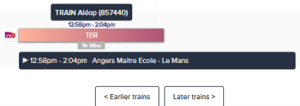
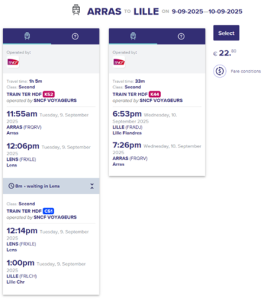
UPDATED DISPLAY OF SNCF OFFERS

To align with new SNCF requirements, we’ve enhanced the way rail offers are presented during the booking process, ensuring travellers receive clearer and more complete information. The cart now displays full details of the selected SNCF offer, including the rail operator name and the complete offer description in text form (no images required). These updates help travellers better understand their fare options and avoid confusion, especially when comparing multiple rail services.

Now:
search:

cart:

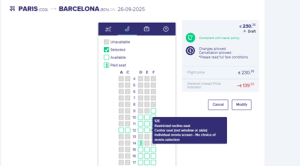
IMPROVED SEAT MAP DISPLAY FOR FLEX FARE

We’ve adjusted the seat map to accurately reflect pricing for Flex fare bookings. Previously, free seats included in the Flex fare were incorrectly displayed as chargeable, causing confusion and support issues. The update ensures these seats are now either unmarked as chargeable or explicitly shown as €0.

This change eliminates ambiguity between fare-included and extra-cost seat selections, improving clarity for users, TMCs, and support teams.

Now:
PLANE seat map

UNIFIED “CARS” DEL&COL INFORMATION DISPLAY

To improve accuracy and reduce confusion for users booking cars using Delivery & Collection (DEL&COL), we’ve updated how the information is displayed in email confirmations and vouchers.

What’s changed?

  • Email confirmation: Now shows the DEL&COL information instead of the nearest rental station information. After the change the rental station is no longer displayed.
  • Booking voucher: Clearly displays the DEL&COL information, replacing any reference to the rental station.
  • Provider consistency: This improvement is applied across all supported providers, ensuring uniform communication regardless of the supplier.

These changes ensure that travellers receive accurate pickup and drop-off location details throughout their journey documentation, helping prevent confusion and ensuring a smoother car rental experience.

Hotel Booking Nudge for Self-Bookers

To support a smoother travel experience, we’ve added a smart nudge for self-bookers: When a trip includes an overnight stay with only transportation services (no hotel), a “Need a hotel?” call-to-action now appears next to the trip summary on the “Bookings” widget in the main dashboard.
This subtle reminder encourages travelers to complete their booking by adding accommodation, helping avoid last-minute issues and ensuring all trip essentials are covered.

Support of Google locations in offline form for car rental services

 Users can now enter any pickup or return address directly into the offline car rental form, no longer limited to a predefined dropdown list or default addresses. The address field is powered by Google, so as long as the location is recognized, it will be accepted and auto-completed. This improvement gives travelers greater flexibility to specify the exact address they need for car rental services. 

Smarter calendar placeholders for 1-night hotel stays

To improve calendar readability, we’ve adjusted how Outlook invitations are sent for 1-night hotel bookings. Instead of blocking the entire day, the calendar event will now default to 8:00 PM to 8:00 AM the next morning. This change ensures hotel stays are visible without cluttering the calendar, especially helpful for busy professionals managing multiple meetings.

Easier carpooling consent management for admins

We’ve added new options in the Car transport configuration to streamline how carpooling consent is managed across a Business Unit. Admins can now enable similar car booking suggestions by default for all travellers, bypassing the need for individual consent. Alternatively, they can allow arrangers or admins to give consent on behalf of travellers. These new settings help simplify coordination while maintaining transparency through clear tooltips and disabled checkboxes in individual user profiles.

Removed elements for cleaner offer view during search

We’ve removed the feedback and notification buttons from the search results view to reduce distractions. This change was made following user feedback that the buttons overlapped with key pricing information, especially for negotiated or subscription rates. The result: a smoother, more focused browsing experience.

Differentiated Accor loyalty cards now supported

Users can now differentiate between Accor – ALL Plus VOYAGEUR and Accor – ALL Plus IBIS cards when applying hotel loyalty discounts. Previously, a single card label Accor – ALL Plus created confusion and incorrect rate applications, especially when travelers held an IBIS-only card and booked outside eligible brands. 

With this update, each card is correctly mapped to its respective hotel brands: 

  • ALL Plus IBIS applies only to Ibis, Ibis Budget, and Ibis Styles   
  • ALL Plus VOYAGEUR applies to all Accor group hotels 

This ensures loyalty rates are only shown where valid, reducing user frustration and improving rate accuracy for corporate travelers.

Request a demo

Request a personalized demo to unlock the potential of seamless booking with Goelett.
Explore how our online booking solution can enhance travel management at your company.

Please note: this form is not intended for travel support inquiries.
If you need help with an existing booking, please contact your travel manager or agency.
You can find their contact details by clicking on your initials in the main dashboard and selecting “Agency contact information.”

Request a demo EN

The information you provide on this form can be used by Goelett to send you company news. You have the right to access, modify, delete and port all data concerning you.