Product releases and changelog

Selected Product: Desktop

Explore the most recent changes, updates, and new features introduced in the Goelett app. Stay informed about our ongoing improvements, designed to enhance the user experience and optimize the application’s performance

Select
product type

Enabled hotel cancellation and modification for split travellers in multi-pax bookings

Travellers in multi-passenger hotel bookings can now modify or cancel their individual trip segments even after the group has been split. This enhancement provides greater flexibility and autonomy, especially in scenarios where plans change for only part of the group. Additionally, it reduces the need for agent intervention.

New API Endpoints for CO₂ Emissions data

We’ve added new sustainability endpoints to the Goelett API, allowing clients and partners to access CO₂ emissions data directly from our platform. The new functionality allows to:
  • Retrieve CO₂ emissions per user per year, both as a total and broken down by travel segment.
  • Download and manage annual CO₂ budgets for individual users.
These endpoints support external reporting, internal sustainability dashboards, and corporate CO₂ reduction strategies.

Assurever Insurance available for Sabre

Following the successful launch of Assurever insurance integration for Amadeus, we’re now extending the functionality to Sabre. With this release, insurance details will be automatically added to the PNR, ensuring agents and travellers have easy access to relevant coverage information. This enhancement supports better transparency, smoother servicing, and consistent experience across GDS platforms.

ASSUREVER AS AN INSURANCE PROVIDER FOR AMADEUS

We’re excited to announce the integration of Assurever as a new insurance provider for Amadeus. With this release, travel agencies and partners can now seamlessly access Assurever’s insurance offerings directly through the Amadeus platform. This integration expands the range of protection options available to travelers, helping agencies deliver greater peace of mind, flexibility, and confidence when booking trips. In next steps we will enable such a possibility for Sabre users.

SUSTAINABILITY SECTION NOW AVAILABLE FOR GUEST PROFILES

To further promote environmentally conscious travel behavior, we’ve extended access to the Sustainability section for guest profiles. Guest users, who typically have limited privileges, can now view relevant CO₂ emissions settings directly within their profile view. When enabled by an administrator, this feature ensures that the Sustainability section becomes visible for guest profiles, increasing transparency and supporting broader sustainability engagement across all user types.

TRIP NAME AUTO-UPDATE AFTER TRIP MODIFICATION

To ensure trip names always reflect the most accurate itinerary, we’ve enhanced how they update after modifications. By default, trip names are auto-generated based on key itinerary details such as destination and dates.

With this update:

  • If the user has never manually edited the trip name, any changes to the trip (e.g., destination, travel dates, or deleted segments) will automatically update the trip name to match the latest itinerary.
  • If the user has manually entered a custom trip name (e.g., “Sales trip Berlin Q3”), the system will preserve that custom name, even if the trip is modified later.

This enhancement reduces manual work while keeping full control in the hands of the traveler when a personalized name is preferred.

OFFLINE FORM IMPROVEMENTS

To improve usability and accuracy when entering offline booking requests, several refinements have been made to the offline form:

  • The Next and Back buttons on the initial data entry screen have been reordered for improved flow and consistency with user expectations.
  • For easier access, SNCF now appears first in the list of rail subscription options (previously sorted alphabetically). This reflects common traveller preferences.
  • Label French translation update: The label “SNCF Discount Cards” is now correctly translated to “SNCF Carte de Réduction”.

EMAIL NOTIFICATIONS FOR POST-SALES BOOKING MODIFICATIONS

To help approvers stay informed and maintain control over travel compliance, Goelett now sends an email notification when a rail booking is modified after approval and ticketing. Now, the original trip approver who validated the booking receives and email notification:

  • Whether the modification is in or out of policy;
  • Whether the change results in a price increase.

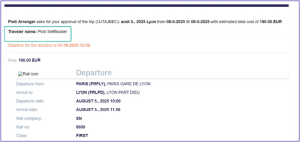
TRAVELLER NAME NOW DISPLAYED MORE PROMINENTLY IN APPROVAL REQUESTS’ EMAILS

To reduce confusion and improve clarity for approvers, we’ve updated the layout of travel approval request emails. Previously, the assistant’s name was displayed at the top of the message, while the traveller’s name appeared only at the bottom, making it easy to miss
This enhancement improves readability and helps streamline the approval process, especially when assistants manage bookings on behalf of others.

Now:

EXTERNAL BOOKING MODIFICATIONS MADE IN TRAINLINE AND PAO NOW SYNCHRONISED IN GOELETT

Bookings modifications (such as changing the time or cancelling it) made through external channels – like a ticket counter, self-service machine, or the other external apps – are now automatically updated in Goelett. Previously, when user modified their rail booking in a third party tool it required manual effort to have data synchronised.

Now, changes will be automatically reflected whenever there is a change using external systems to user booking. This means Goelett will always show the most up-to-date information, giving users a consistent and reliable experience no matter where their trip is managed.

Request a demo

Request a personalized demo to unlock the potential of seamless booking with Goelett.
Explore how our online booking solution can enhance travel management at your company.

Please note: this form is not intended for travel support inquiries.
If you need help with an existing booking, please contact your travel manager or agency.
You can find their contact details by clicking on your initials in the main dashboard and selecting “Agency contact information.”

Request a demo EN

The information you provide on this form can be used by Goelett to send you company news. You have the right to access, modify, delete and port all data concerning you.