Product releases and changelog

Selected Product: Mobile

Explore the most recent changes, updates, and new features introduced in the Goelett app. Stay informed about our ongoing improvements, designed to enhance the user experience and optimize the application’s performance

Select
product type

Improved support for “on request” hotel & car bookings

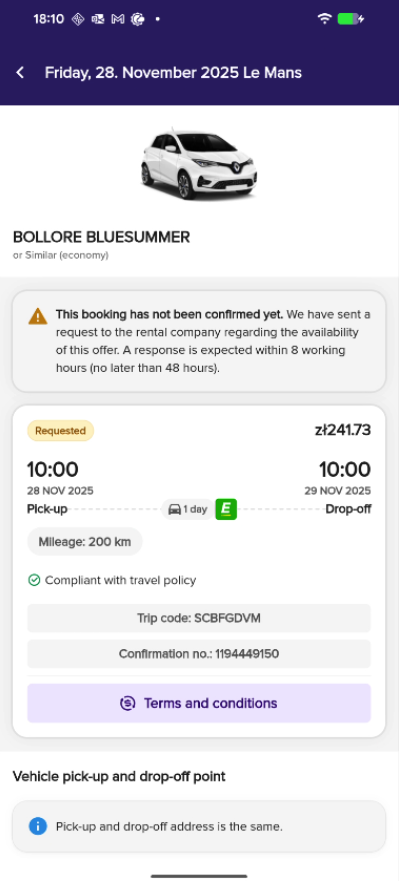
We’ve enhanced the experience around on request hotel and car bookings to provide app users with better clarity and reduce confusion when a booking isn’t instantly confirmed.

Now:

  • Clearer status updates: you can now see more informative messages in the app, including an explanation of what “on request” means and when you can expect a response from the hotel or rental company.
  • Voucher logic: Hotel vouchers for on request bookings are no longer shown until the reservation is officially confirmed, preventing premature use or assumptions of confirmation.

These changes help set clear expectations and support smoother communication between travellers and providers.

Example:
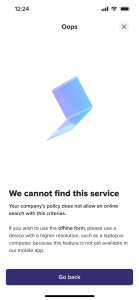
Offline form redirect explanation

In cases where a booking can only be completed via the offline form (e.g. due to specific search constraints), you will now see a clear explanation of why you are being redirected. This ensures transparency and avoids frustration during the booking flow.

How does it look now?

Native hotel & flight search now available in the mobile app

With this release, we’re excited to launch new native search for hotels and flights directly within the mobile app. Until now, users were redirected to a web view for these actions. Thanks to this improvement, the entire booking experience stays within the app environment, offering you  smoother navigation, faster performance and pages optimized for mobile use. In addition, we’ve introduced contextual messages during the search journey, so you are clearly informed about important actions (like missing hotel booking) or relevant information at the right time.

This update marks a major step forward in delivering a more intuitive, helpful, and on-the-go booking experience.

Single click copying of trip codes in Mobile App

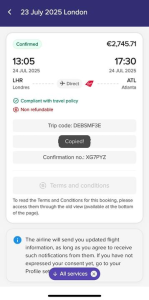
Travelers can now easily copy key booking identifiers – such as the Trip Code, PNR, and Trip Confirmation Number – directly from the booking summary view in the mobile app. 

This enhancement saves time and effort when generating a boarding card, reporting an issue via email or support form, especially for long or complex codes that are difficult to memorize. 

New native rail search in mobile app

A new native card layout has been implemented for rail search in the mobile app, streamlining the booking experience in on-the-go conditions. The updated interface is optimized for speed, clarity, and minimal input effort, enabling bookers to plan train journeys quickly and intuitively, even in crowded or low-connectivity environments. 

With this new view, users can now: 

  • See a list of preferred train stations for quicker selection, 
  • Use an improved calendar with clear To/Return date indicators and visible time slots, 
  • Apply additional filters, such as travel class or accessibility options. 

Additionally, contextual search messages are now supported, allowing users to receive real-time updates (e.g. delays, disruptions) directly within the search experience. 

This enhancement significantly improves mobile usability and can contribute to higher rail booking completion rates.

Missed savings now displayed in mobile booking cart

To improve transparency and encourage cost-aware decisions, the missed savings indicator-and Lowest Logical Fare (LLF) logic is now also visible in the mobile booking cart. This enhancement helps travelers stay informed and supports corporate travel policies by highlighting economic indicator in the mobile view.

New seat map view for PAO ITP bookings in mobile app

We’ve introduced a new seat map view for rail bookings made via the PAO provider, including PAO ITP, in the mobile app. This enhancement allows travelers to view and select seats more easily on mobile, improving the booking experience for PAO-based rail journeys.

ENHANCEMENT TO RAIL CARRIER PNRs IN GOELETT MOBILE APP

We have introduce an improvement to user experience by providing travelers with access to all carrier PNRs associated with their rail bookings. This allows for more effective management of train bookings, even outside the Goelett app. 

Due to current limitations in linking carrier PNRs to specific rail segments, all returned PNRs will be displayed. This ensures travelers have access to all necessary information, particularly for complex itineraries involving multiple carriers. A “Carrier PNRs” button will be available under the main chips, regardless of the number of PNRs. This implementation will be revisited and refined once segment-level PNR information becomes available.

How does it look in the app?

RAIL TICKETS AVAILABLE IN THE MOBILE APP

This release introduces a significant upgrade to the Goelett mobile app user experience for rail travel, enhancing convenience and control over the rail tickets. By this new functionality, access and managing rail tickets directly within the app is easier than ever, thanks to the following updates.

  • Easily access a variety of digital ticket formats, including:
    • Downloadable PDF tickets
    • QR codes (automatically stored for offline use)
    • Information if a ticket was sent to the traveler’s e-mail directly
  • Atoc Kiosk ticket support:

For bookings requiring Atoc kiosk ticket collection, a clear reference code will be displayed within the Rail Card. This code can be used to retrieve your tickets at the designated kiosk at the station.

  • Enhanced offline access:

QR codes and Atoc kiosk ticket collection reference codes are automatically stored for offline access, ensuring you can access your ticket information even without an internet connection.

Additionally for Eurostar users crossing UK border, there is new notice enablement:

  • A prominent yellow warning will be displayed for upcoming Eurostar journeys booked through channels other than Trainline.
  • This warning alerts travelers that they are required to provide their passport details to Eurostar directly to ensure their travel documents are issued correctly.

These new features have been carefully designed for clarity and ease of use, with clear action buttons and relevant ticket information prominently displayed in the app.

Thanks to the contextual Information, Goelett app intelligently determines the appropriate ticket format for each booking and displays the relevant information accordingly.

This update empowers users to manage their rail travel more efficiently and conveniently. With a variety of digital ticket formats, intuitive design, and enhanced offline functionality, users can now travel with greater confidence and more sustainably without any need for physical tickets, even if they are out of internet on the trip.

Rail card 1.0 available in the mobile app

We’re excited to announce the launch of the rail card in the Goelett mobile app (MVP version). This new feature provides a convenient and informative way to view train reservations directly within the app.

Here’s the list of items available in this initial release: Access detailed information for all confirmed train reservations, including: trip name, segment details (departure/arrival times and dates, class services, stations, train logos), trip costs, travel policy compliance, cancellation policy, PNR and confirmation number (if available), terms & conditions (potentially with links to carrier websites), CO2 emissions for the journey, and more.

Current limitations:

  • Limited access: Currently, Rail Cards are only accessible from the Traveler’s trip view. Approvals list functionality is coming soon.
  • Web view for specific actions: For now, opening reservations directly from notifications or similar booking links triggers a web view experience. Native functionality for these actions is under development.
  • Tickets not yet available: Viewing tickets within the Rail Card is not included in the MVP. We’re working on integrating this functionality shortly after launch.

Additional notes:

  • The Rail Card displays information in both English and French.
  • We offer “Show old view” functionality for users familiar with the previous reservation interface.
  • This is the initial version. We’ll continue to develop and improve the Rail Card based on users’ feedback.

Request a demo

Request a personalized demo to unlock the potential of seamless booking with Goelett.
Explore how our online booking solution can enhance travel management at your company.

Please note: this form is not intended for travel support inquiries.
If you need help with an existing booking, please contact your travel manager or agency.
You can find their contact details by clicking on your initials in the main dashboard and selecting “Agency contact information.”

Request a demo EN

The information you provide on this form can be used by Goelett to send you company news. You have the right to access, modify, delete and port all data concerning you.